


Members-only perks


The Ultimate Car Rental Guide
Learn everything you need to know to have a positive car rental experience.
Welcome to the Ultimate Car Rental Guide. We’ll show you step by step how easy it is to rent a car with Hertz. Some of the topics we’ll cover include:
- Why you should rent a car with Hertz
- How to start the car rental process
- Important things to consider when choosing your vehicle
- How to pick-up and drop-off your rental car
Whether it’s for business, pleasure or leisure - renting a car gives you the flexibility to be in total control of your trip. Let’s start at the beginning…
Why rent a car?
Rental cars offer flexibility, reliability and enjoyment compared to other travel options. There’s no need to rely on public transport. Your trip, your ride – you’re in control.
Let’s look at some of the reasons why people rent with Hertz.

Visiting Family
Renting a large van or SUV can help you fit your loved ones into one vehicle - saving you time, money and stress. Big family? When they visit you - driving arrangements can become a tricky matter. A Hertz rental means easy travel for all.

Save on Wear and Tear
Renting a car lets you have the freedom of mobility without the costly responsibilities of repairs and maintenance. Car parts can be hard to come by, especially in recent years as automakers add more and more technology into their designs. Owning your own vehicle can therefore become expensive and renting can save you hundreds, or even thousands a year.

Weddings, Reunions and Other Special Occasions
The right car can make your next occasion or event truly memorable, providing a special experience for your family, friends and guests. For example, renting a luxury car for a family wedding, or your school reunion is a great way to enjoy these experiences without the costs and worries of actually owning one.

Car at the Repair Shop
If your car is going through extended repair or maintenance – a Hertz rental can cover you until you get it back.

Moving
Whether you need to move a few boxes, furniture or a whole household - renting a pick-up or box truck can give you the space and performance needed to get the job done quickly.

Road, Camping and Fishing Trips
Renting a car gives you the flexibility you need to fit all your friends, family, gear, and miles into your next getaway. Public transportation can’t take you everywhere. Sometimes the car you own doesn’t have the space, comfort or features you need to take a road, camping or fishing trip.
Tip: You can plan your next road, camping or fishing trip today when you visit the Hertz Road Trip Planner.


Save Money by Renting vs. Buying
Cars can be a great investment but owning one can also be costly. From maintenance and repairs, to fuel costs and storage - sometimes owning a car can take more than it gives. We have a huge fleet of vehicles so you can select the perfect car for that long-awaited trip, or special occasion.
How to Rent with Hertz
Renting a car can be a quick and easy process. – especially if you know where to start. Just head to the reservation page, enter the details – and voila, we’ll list the cars available to you in that area, at that time. It’s that simple.
But what does that process look like?

Renting Directly Through a Location Page
Here is the Hertz Car Rental location page. In this example, we’ll look at the location page for the Denver – Welton HLE in Denver, Colorado.
You can start the car rental process by entering your pick-up and drop-off dates, and locations, in the fields shown.
Even if you scroll down, the reservation box will stay there. This allows you to explore the location's opening hours, contact information and even nearby events/attractions of interest in the Denver area.
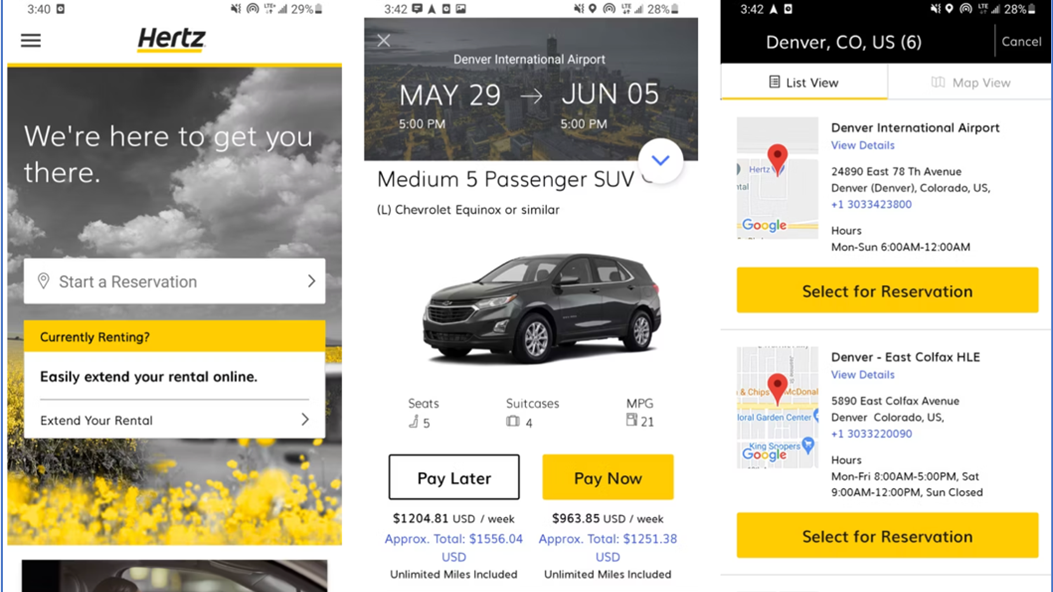
Mobile Phone Apps
You can also use our app to make a booking. Don’t like queues? You can also use it to skip the line, cutting your waiting time down.
Choosing Your Hertz Vehicle
Choosing a vehicle to rent may seem like the easiest, and most obvious part of the car rental process. But it’s also the most important one.
There are a lot of reasons to rent a car, so it’s important to match the right car, truck, or van to your unique car rental needs.
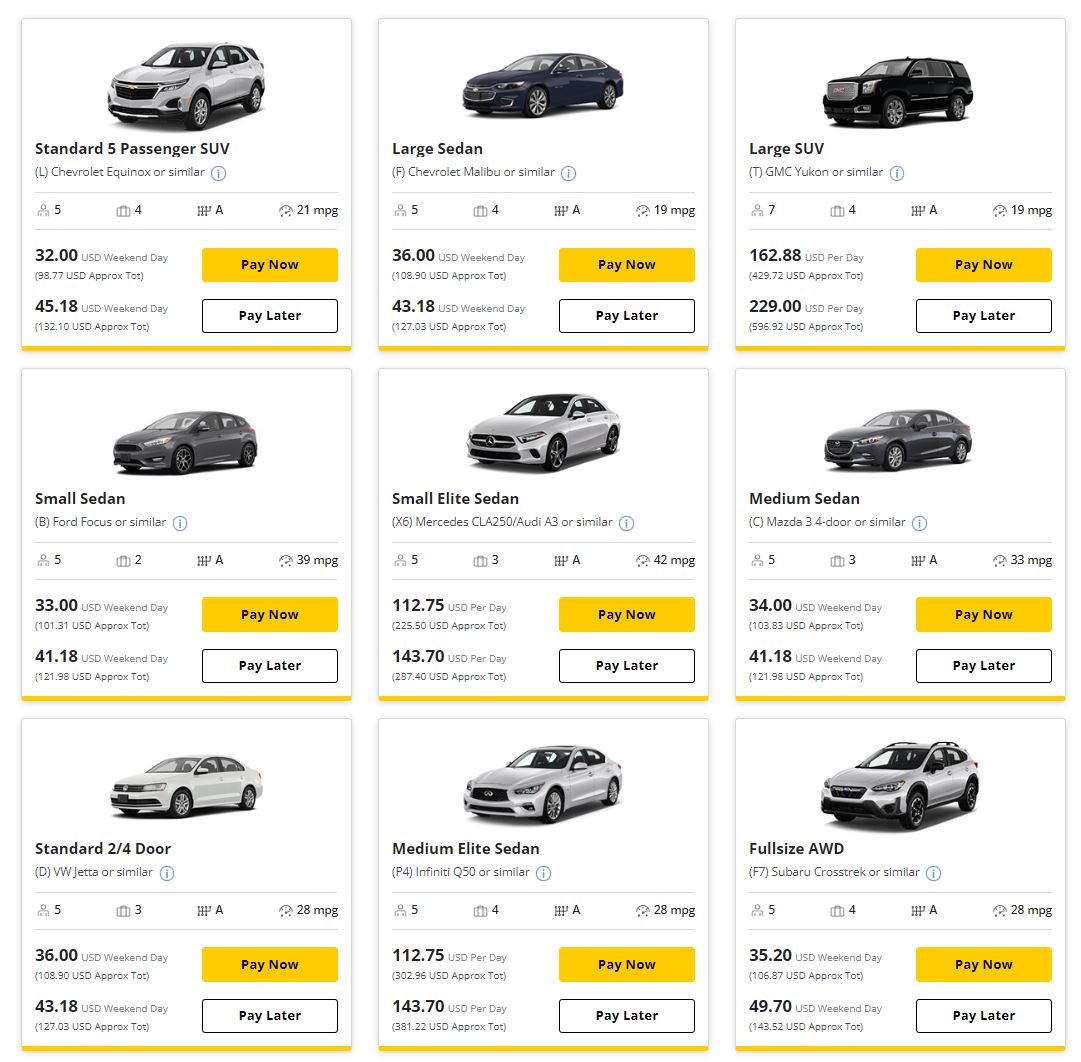
Here are a few examples of the different vehicle types you’ll be able to choose from. We have cars suited for every occasion. Whatever your need, we’re sure to have something that works for you.


How do you pick the right car? You can start by asking yourself these questions…
- Am I driving alone or with other people?
- If I’m driving with other people, how many?
- How much luggage or cargo will I have?
- Do I want a manual or automatic transmission?
- Do I want a gasoline-powered vehicle or an electric vehicle?
And maybe the most important question…
How much do I want to pay?
When you get the option to select your rental vehicle, you will see the rate, total number of passengers, estimated trunk/cargo space, transmission type, and fuel/charge range, plus an image and short description of the vehicle.
Top Tip: The sooner you start planning your trip, the better chance you have of locking in the best rate possible. As the famous saying goes, the early bird catches the worm!
Modifying Your Car Rental Reservation
Plans can change in the blink of an eye. So if you need to update, change or cancel your car rental reservation – we offer flexibility, as long as:
- You prepaid for your rental.
- You modify, update or cancel your car rental reservation by midnight two days before your scheduled pick-up time.
When Can You Modify or Cancel Your Car Rental Reservation?
You can modify or cancel a car rental in two easy ways:
- Before you checkout and complete your car rental reservation.
- At least 48 hours before your scheduled pick-up time.
Plus, you can amend or cancel your reservation online through the Hertz website, app or by calling your Hertz pick-up location.

Hertz Extras & Add-Ons
After you’ve chosen your vehicle, you’ll have the option to select extras to help customize your rental experience.
For example, we offer a loss damage waiver that not only gives you peace of mind but also the added safety, legal, and financial security you want for every trip.
Let’s take a closer look at Hertz’s car rental add-ons.

Loss Damage Waiver (LDW)
Loss Damage Waiver (LDW) is different from insurance in that it protects you and your wallet from any damage to or the complete loss of your Hertz rental car. It applies as long as you weren’t breaking any laws or violating the Rental Agreement.

Liability Insurance Supplement (LIS)
Adding a Liability Insurance Supplement (LIS) to your car rental can help protect you from third-party automobile liability claims for bodily injury and property damage.

Personal Protection Package
Protect yourself from medical expenses and loss or damage to your belongings during your car rental with the Hertz Personal Protection Package.

Fuel Purchase Option (FPO)
Skip the pump and save time by prepaying for fuel with the Hertz fuel purchase option. When travelers know they’re going to use a full tank of gas (or more) the fuel purchase option gives them the flexibility and freedom to pay at pick-up to save time (and maybe even money) at drop-off.

Child Car Seat
Traveling with children? Save the hassle of transporting your own car seats by hiring them with your car rental. No need to mess around carrying large and bulky seats, we’ll have them ready when you pick up your rental.

Did you know…?
Hertz Gold Plus Rewards® members can select their preferred value-add services and extras in their profile. All Hertz car rentals come loaded with the add-ons and peace of mind you need to drive with confidence mile after mile.
Picking Up and Dropping Off Your Rental Car
You’ve picked out your car. You’ve chosen your extras. You’ve selected the pick-up and drop-off location. Now all that’s left to do is pick-up your rental car.

How to Pick Up Your Rental Car
If you’re picking up your vehicle at an airport location, you’ll need to find the Hertz Rental Car counter, and in most cases, this is as easy as simply following the signs.
As you approach your airport of choice, you’ll begin to see signs that will direct you toward parking, the main concourse, different terminals, and a variety of other important locations including the rental car area.
Once you’ve parked or have been dropped off at your departing airport, continue to follow the signs to the Hertz rental counter.
To get you in your rental vehicle and on the road as soon as possible, make sure you have the following with you:
- A valid driver’s license.
- A form of payment (even if you paid ahead, it’s always good to have that same credit card with you just in case).
- Any proof of reservation or rental on a physical print-out or pulled up in a confirmation email on your mobile device.
- As a member of the Hertz team checks you in, they may offer you the chance to make any last-minute changes to your rental. These can include things like adding the Liability Insurance Supplement (LIS), Personal Protection Package (PPP) or other extras you might’ve missed when you made the reservation.
Then, after a quick review of your car rental, a Hertz team member will direct you to your rental car.
If you’re picking up from a Hertz Local Edition location, the process is the same.
- Approach the counter.
- Have your license, form of payment and rental information in hand.
- Review your rental.
- Go to your vehicle.
How to Drop-Off Your Rental Car
When your trip’s over and it’s time to return your rental car, follow this short checklist:
- Fill up, or charge (if you’re driving an electric vehicle) your rental vehicle back to full. If you chose Hertz’s Fuel Prepay option when you made your reservation, you can skip this step.
- Check your vehicle for any personal belongings like charging cables, luggage, clothing, etc. in the front seat, back seat, trunk and frunk.
Time to Rent a Car. Let’s Go!
We hope this guide helps you to see how easy it is to rent a car from Hertz.
If you have any more questions, comments or just want to learn more give us a call at 1-800-654-4173. Our customer service team is open Monday to Friday, from 6 am to 7 pm CST.
You can also contact us via social media on Twitter and Facebook.
Want access to even more car rental guides, hacks and resources?
Check out the Hertz blogs below to learn how to get more out of your Hertz car rental and make your next trip as incredible as it deserves to be.
Renting a Car for Someone Else With Hertz
Rent a car on behalf of someone else with Hertz. Learn more about how the process works, additional driver fees and how to add drivers to your agreement.
10 ways successful people spend their free time
Most people are curious about the productivity hacks and workday schedules of highly successful people – but what about how they spend their free time?
How to Pay for Your Car Rental
When it comes to renting a vehicle from Hertz, it's important to know what the accepted payment methods are and if there are any significant differences between them. This knowledge can make your rental experience smoother and get you on the road faster.
Experience the Grand Canyon at night
Discover the breathtaking beauty of the Grand Canyon at night. Star-filled landscapes are the perfect setting for a memorable visit. Plan today with Hertz.